NAFA Fleet Management Conference and Expo Displays
Atlanta Shows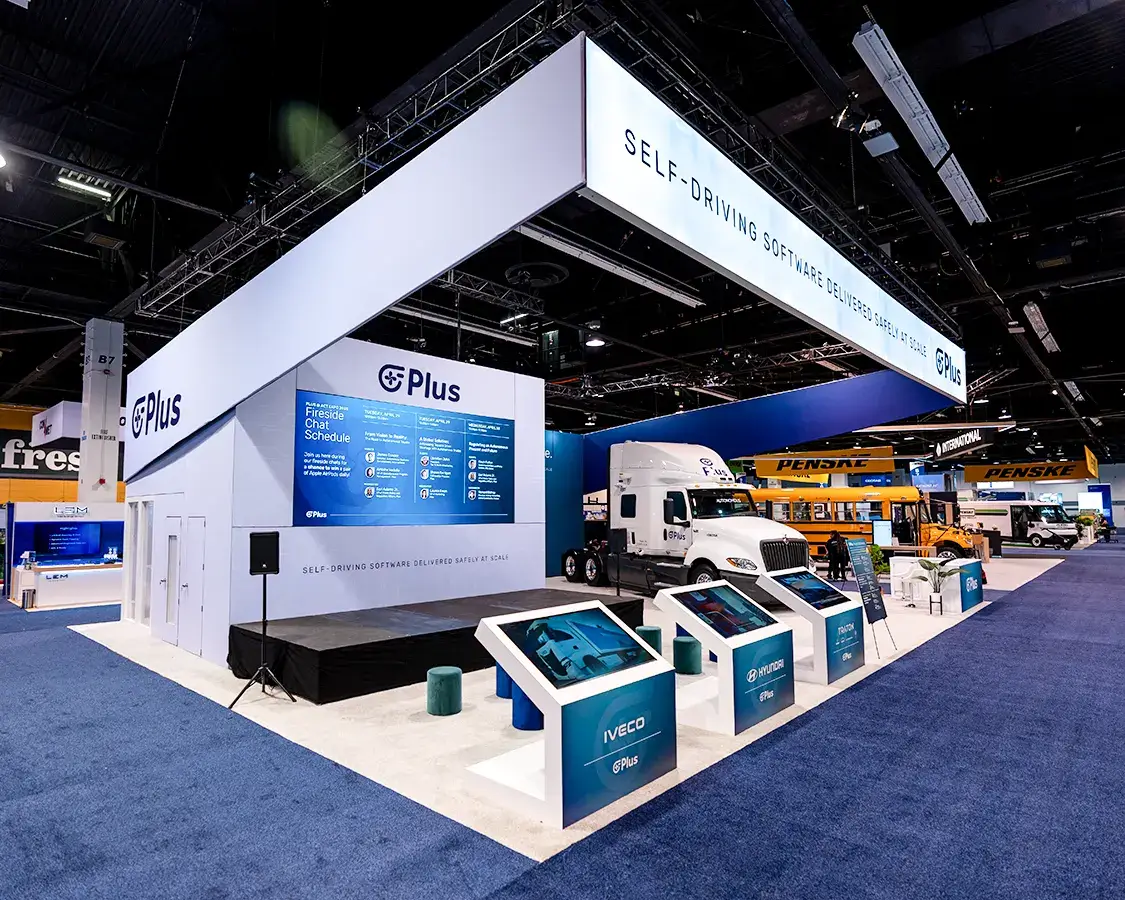
Exhibit displays for NAFA Fleet Management suppliers: a work truck on the floor, charger demos, telematics screens and a display installed around the vehicle.
Fleet managers buy for hundreds of drivers at a time, and they want to see how a product fits the work. At the NAFA Fleet Management Conference and Expo, suppliers bring upfitted trucks, charging hardware, telematics platforms and fuel or maintenance programs, and the display has to carry a vehicle without letting the vehicle swallow the message.
A layout we draw for this sector is a 20 by 20 island with an upfitted pickup angled across one corner, a wall-mounted charger on a short freestanding wall beside it, a curved fabric tower at the opposite corner with the brand and three program names, and a standing counter with two monitors running a live telematics dashboard. A small table behind the tower gives a fleet director a place to sit and look at pricing.
Placing the vehicle before anything else
The truck decides the rest of the layout. We place it on the floor plan by its footprint, door swing and tailgate reach, then fit the tower, counter and charger wall into the space that is left. Angling the truck across a corner shows the side upfit and the bed at once and opens a walkway between the vehicle and the counter.
- Doors and the tailgate need clear swing room so visitors can look inside the cab and the toolboxes.
- Drip pans and floor protection go under the vehicle before the carpet edge is finished.
- The tower sits where it can be read over the roof of the cab from the main aisle.
- Vehicle placement and fuel or battery rules from the exhibitor manual are marked on the drawing before move-in.
Layout choices start in our trade show booth design process.
Charger walls and telematics screens
A charger looks like a box on a post until it is mounted the way a depot would mount it. We build a short framed wall with a backer plate for the unit, a cable hook and a graphic panel explaining the program, and we leave a channel at the base for the power whip. The counter monitors sit on arms with the cables run down the counter leg, and the dashboard runs on a local login so it keeps working if the hall internet drops.
Screens and mounts are arranged through AV partners or your own team. We spec them, receive them and set them on the frame. More on that work is on our trade show AV production page.
Artwork for fleet buyers
Fleet buyers respond to plain program names and measurable outcomes in your own wording. The tower carries the brand and the program names, the charger wall explains the charging setup in a short paragraph, and the truck gets a door decal and a small spec card on a stand. Artwork goes to print several weeks before move-in so the tower fabric and the hard panels arrive with the frame.
Our exhibit graphics production page covers file setup for fabric and rigid panels.
Move-in around a vehicle
Vehicles normally enter the hall on their own schedule, ahead of most freight. Once the truck is parked and protected, the install crew lays the carpet around it, stands the fabric tower, builds the charger wall and sets the counter. Graphics go on last so they stay clean. Your team brings the telematics demo online, and we walk the booth with your lead: door swing, tower visibility over the cab, counter screens and the meeting table.
The full order of work is on our installation and dismantle page.
Information that shapes the drawing
Send the booth number and size, the year, make and model of each vehicle with its length, width and height, and photos of the upfit you want to show. List the charger models and their mounting needs, the screens and software you plan to run and the number of staff in the booth each day. Add your brand guide or finished artwork. With that we place the vehicle, size the tower and write the part list.
Bringing the truck to Atlanta
Fleet suppliers often drive a demo truck to Atlanta from an upfitter while the display freight travels separately. We line the two up so the truck arrives detailed, with fuel or battery levels set to the exhibitor manual, keys handed to your floor lead and the display cases already waiting at the booth. A detailing kit in the counter case handles fingerprints and hall dust, and the install crew wipes the paint before the final walk so the truck looks the way it did when it left the upfitter.
Breaking down and driving out
At close the screens come down first and go into padded cases. The crew strips graphics, breaks down the tower and the charger wall and rolls the carpet back from the truck. The vehicle leaves when the hall releases it, usually after the aisles around it are clear of freight. Cases are labeled for storage or the next stop on your schedule, and you can read more about outbound freight on our expo logistics and shipping page.
Questions Exhibitors Ask
Who drives the vehicle into the hall?
Your driver or a carrier you hire brings the vehicle in during its assigned time. We build the display around it once it is parked.
Can a charger run live in the booth?
Usually it is shown mounted and unpowered, with a screen showing a charge session. If you want it live, we plan the power order and the cable path around it.
Can we show two vehicles?
Yes, if the space allows door swing and a walkway. We test both footprints on the floor plan before we size the rest of the display.
Do you supply the vehicle?
No. The vehicle comes from your fleet, an upfitter or a dealer partner. We plan the display around its dimensions and protect the floor beneath it.
Send the show, venue and booth details
Call (404) 963-0416 or send the show, the hall and your booth number and we will plan the display, the install and the teardown.